Model Scaling
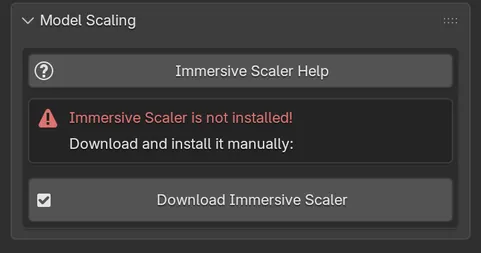
Model Scaling does not scale the model by itself. It shows the interface of Immersive Scaler, a separate add-on made for resizing avatars to a target height and fixing their proportions for VR.
Install Immersive Scaler
Section titled “Install Immersive Scaler”The panel tells you what it found:
| Message | What to do |
|---|---|
| Immersive Scaler is not installed! | Click Download Immersive Scaler, install the zip from its releases page as an add-on, then come back. |
| Immersive Scaler is not enabled! | Click Enable Immersive Scaler. Cats turns off older copies and enables the current one. |
Cats needs Immersive Scaler 0.5.2 or newer. Once it is installed and enabled, its controls appear directly in this panel.
Use it
Section titled “Use it”The controls belong to Immersive Scaler, so its own guide is the reference: click Immersive Scaler Help at the top of the panel to open it.