Visemes
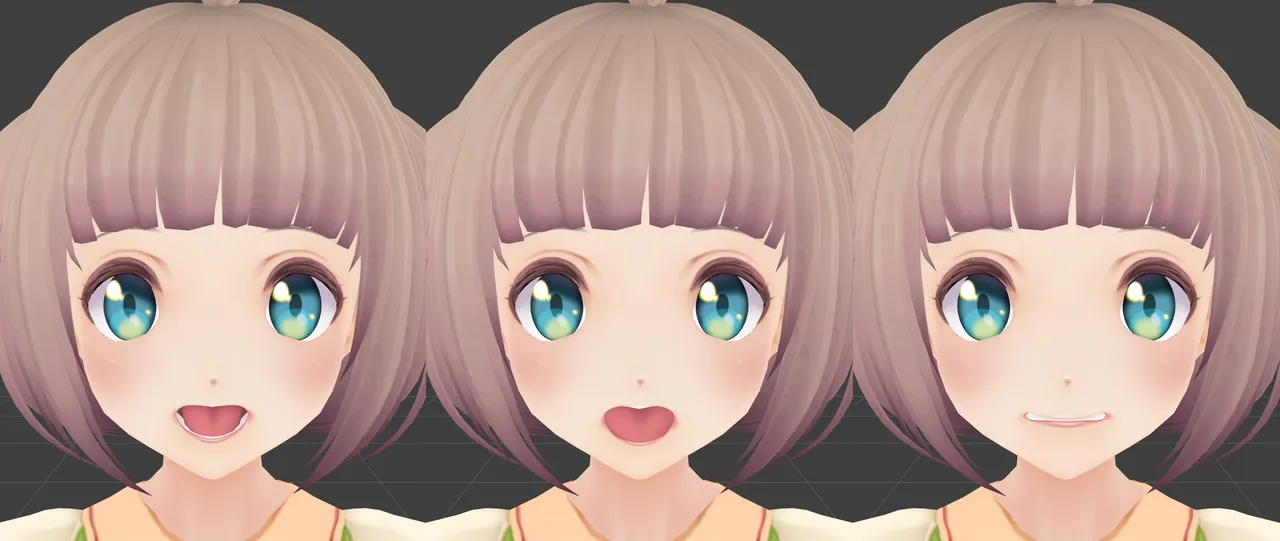
VRChat drives lip sync with fifteen shape keys named vrc.v_aa to vrc.v_th. Most models only ship a handful of mouth shapes. The Visemes panel builds all fifteen by mixing three shapes you pick: an open “aa”, a rounded “oh” and a clenched “ch”.
The panel starts collapsed in the CATS tab.
Before you start
Section titled “Before you start”- The mesh with the mouth shape keys must be parented to the armature. Cats only lists meshes that are children of the model’s armature, so a loose mesh gives you No meshes found!.
- Join the meshes first, so the face ends up in one mesh with all its shape keys. Fix MMD Model does it on fresh MMD and VRM imports, and Join all meshes in Quick Access does it on any model.
- Find three shape keys that actually move the mouth. On MMD models they are usually
あ,おandいbefore translation, orA,OandIafter.
Create the visemes
Section titled “Create the visemes”-
Open Visemes in the CATS tab. If the model has more than one mesh, pick the one with the mouth in Mesh.
-
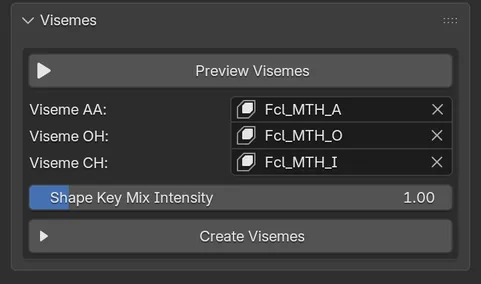
Set the three mouth shapes:
Field Pick the shape key where the mouth… Viseme AA is wide open, as when saying “aa”. Viseme OH is rounded, as when saying “oh”. Viseme CH has open lips and clenched teeth, as when saying “ch”. Cats pre-fills these fields with common names such as
MTH A,AhorA. Check each one: a pre-filled name is a guess, and it can point to a key your mesh does not have. -
Leave Shape Key Mix Intensity at
1.0for a first try. Lower it if the mouth opens too far, raise it if the lip sync looks weak. It goes from 0 to 10. -
Click Preview Visemes and step through the sounds in the dropdown to see each mix on the model. Click Stop Preview to put the shape keys back the way they were.
-
Click Create Visemes. Cats reports Created mouth visemes! when it is done.
How each viseme is mixed
Section titled “How each viseme is mixed”Each output key is a blend of your three shapes. The weights below are multiplied by Shape Key Mix Intensity.
| Shape key | AA | OH | CH |
|---|---|---|---|
vrc.v_aa |
1 | ||
vrc.v_ch |
1 | ||
vrc.v_dd |
0.3 | 0.7 | |
vrc.v_e |
0.5 | 0.2 | |
vrc.v_ff |
0.2 | 0.4 | |
vrc.v_ih |
0.3 | 0.7 | |
vrc.v_kk |
0.7 | 0.4 | |
vrc.v_nn |
0.2 | 0.7 | |
vrc.v_oh |
0.2 | 0.8 | |
vrc.v_ou |
1 | ||
vrc.v_pp |
tiny | tiny | |
vrc.v_rr |
0.3 | 0.5 | |
vrc.v_sil |
tiny | tiny | |
vrc.v_ss |
0.8 | ||
vrc.v_th |
0.4 | 0.15 |
vrc.v_pp and vrc.v_sil are almost closed mouths. Cats gives them a very small weight so that no two keys are exactly identical.
What else changes
Section titled “What else changes”Creating visemes does more than add fifteen keys. Expect these side effects:
- An existing key with the same name, such as an old
vrc.v_aa, is deleted and rebuilt. - The shape keys are sorted: Basis first, then the
vrc.blink_*andvrc.lowerlid_*keys from Eye Tracking, then the visemes. - The armature object is renamed
Armature, and an Empty that parents the armature is removed. - All objects are unhidden and switched to Object mode while it runs.
When something looks wrong
Section titled “When something looks wrong”- The mouth tears or stretches. Lower Shape Key Mix Intensity and create the visemes again. Cats may also warn that a viseme deforms the mesh a lot, when a vertex moves by 40% or more of the mesh’s size.
- A re-run seems to change nothing. Cats remembers the mixes it already built during the current Blender session. If you create visemes again with the same three source keys, some of them may be skipped. Restart Blender before trying a different intensity.
- The panel shows
VisemePanel.error.noShapekeys. That raw text means the selected mesh has no shape keys at all. Pick the mesh that holds the face.
In Unity, open the avatar descriptor, set Lip Sync to Viseme Blend Shape and select the mesh. Because the keys use the vrc.v_* names, the SDK’s auto-detect fills every viseme slot for you.