Settings & Updates
Settings & Updates is near the bottom of the CATS tab, collapsed by default.
Settings
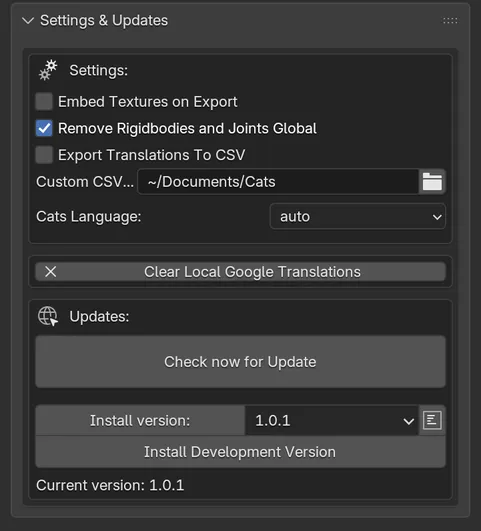
Section titled “Settings”| Setting | Default | What it does |
|---|---|---|
| Embed Textures on Export | Off | Packs textures into the FBX written by Export Model. Unity extracts them into a folder on import. The file gets bigger, and this does not work for everyone. This setting is saved for all your blend files. |
| Remove Rigidbodies and Joints Global | On | Deletes every collection named like “rigidbody”, with its objects, whenever you use most Cats buttons. Turn it off only if you need MMD physics kept. |
| Export Translations To CSV | Off | Writes each translation run to a CSV file listing original and translated names. The blend file must be saved first. |
| Custom CSV Export Location | Documents/Cats |
Where those CSV files go. |
| Cats Language | auto | The language of the Cats interface: English, Japanese, Korean or Simplified Chinese. With auto, Cats picks the language itself. |
Clear Local Google Translations deletes the Google Translate results Cats has cached on your computer. Names will be translated again from scratch next time. This cannot be undone.
Updates
Section titled “Updates”The updater checks the project’s releases:
- Check now for Update looks for a new release. The button then reads Update now to followed by the new version, or Up to Date!
- Install version lets you pick and install a specific release, with its patch notes.
- Current version shows what you are running.
Cats installs updates through Blender’s own extension installer. When it is done, it shows Restart Blender to complete update!